
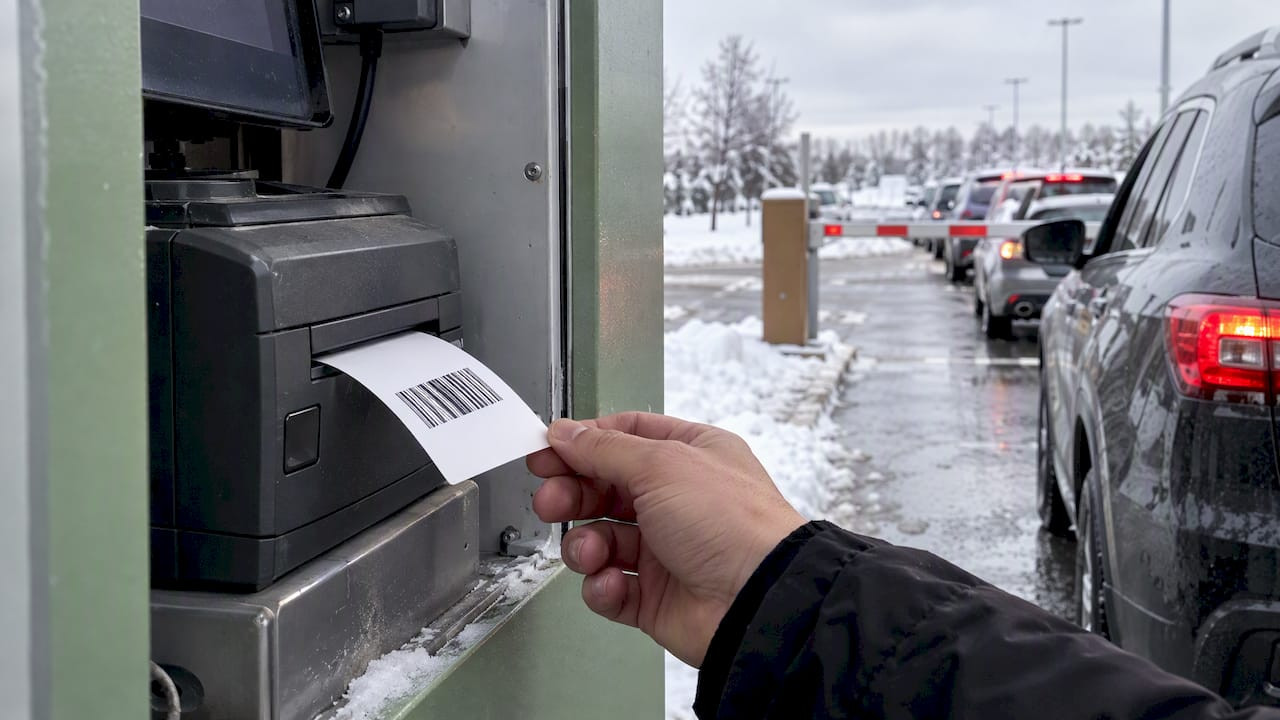
Cold Weather Thermal Tickets: Keep Prints Sharp in Winter

Cold weather thermal tickets are thermal parking, valet and event tickets that have to print, feed and scan reliably in unheated booths, open-air lanes and outdoor gates. Thermal printers work in conditions that run from below freezing to over 100°F, and winter is where weak paper choices, neglected print heads and poor storage show up first. This guide covers what changes in the cold, which specifications to check before the season starts, and a routine that keeps tickets legible when lines are longest.
TL;DR
- Thermal printers and paper are used in conditions from below freezing to over 100°F, so confirm the printer maker’s rated range and the paper’s specification before winter, not during it.
- Store thermal stock cool, dry and out of sunlight. One manufacturer’s paper spec calls for no more than 25°C (77°F) and under 60% relative humidity.
- A monthly print head and platen cleaning, a clear paper path and a self-test print prevent most faint, blank or jammed tickets.
- Winter demand arrives in compressed bursts, so stock extra rolls at every lane and plan for partial equipment failures.
- When thermal is the wrong fit for an exposed lane, a pre-printed or multi-part carbonless ticket is a dependable backup.
Table of Contents
- What “cold weather thermal tickets” means in practice
- Why winter makes ticket problems more costly
- How cold affects printing, readability and handling
- What to verify before the cold season
- A winter maintenance routine that prevents most failures
- Troubleshooting faint, blank or jammed tickets
- When thermal is not the best fit for a lane
- Planning stock and supply for winter
- Our perspective: reliability first
- Ticket options for winter operations
- FAQ
- Sources
What “cold weather thermal tickets” means in practice
Thermal tickets are printed with heat, not ink. A print head warms tiny elements, and a coating on the paper darkens where the heat touches it. That is why the tickets work so well in high-speed parking machines, event gates and handheld printers: there are no ribbons or cartridges to replace.
It is also why temperature matters. Heat is the whole mechanism, so a printer or paper stock that struggles to hold the right conditions will show it on the ticket. In winter, operators see the same handful of problems:
- Prints that look lighter than they did in September.
- Tickets that print well in a heated office and poorly in an outdoor booth.
- Paper that curls, sticks or feeds unevenly after a night in an unheated cabinet.
- Barcodes that scan at the gate in the afternoon and fail at the first morning rush.
None of these means thermal is the wrong choice for winter. They mean the paper, the printer and the handling routine have to be matched to the real environment of each lane.
Why winter makes ticket problems more costly
A faint ticket is an inconvenience in July. In January it can stall a line of drivers standing in the cold. Winter event operations have a particular shape: in cold-weather markets, many attendees delay arrival to minimize time outside, which compresses arrival windows and concentrates demand into a shorter period before gates open or kickoff.
That compression changes the math on every small defect:
- A printer that needs a restart costs more minutes when 40 cars are queued behind it.
- A scanner that rejects one ticket in twenty creates a visible backup.
- A roll that runs out mid-rush has to be swapped by someone wearing gloves, in the weather.
The same source frames winter operations as a matter of reliability over optimization: plan for partial failures and design arrival routes with safety in mind. For ticketing, that means redundancy at the lane: spare rolls within arm’s reach, a second printer or a manual fallback, and staff who know the first three things to check.
How cold affects printing, readability and handling
Print quality
Thermal quality depends on the paper’s heat sensitivity matching what the print head delivers. When the printer, paper or both are colder than they were designed for, output can come out lighter. Barcodes suffer most, because a barcode needs crisp contrast between bars and spaces, and a pale print can be the difference between a clean scan and a rejected ticket.
Print head and platen condition
Winter does not clean a print head. Dust, adhesive residue and environmental contaminants build up all year, and they reduce thermal conductivity, which shows up as streaks, fading or blank sections. A printer that was marginal in autumn tends to become a problem when the cold lowers its tolerance.

Paper handling
Paper that has been stored badly may feed less smoothly. Rolls that spent the night in an unheated space should be allowed to settle into the working environment before they are loaded, and loose rolls should never be left on a dashboard shelf, near a heater vent or in a sunny window.
Long-term legibility
Thermal prints fade over time. One manufacturer’s documentation for a thermal paper notes that printed images can lose intensity from direct sunlight, UV rays, temperatures that may easily exceed 25°C, plasticizers, solvents or strong mechanical friction. Winter does not remove those risks. A ticket left on a dashboard in low winter sun, or a roll stored beside a heater, is still exposed. If your tickets need to survive weeks, such as monthly permits or multi-day event passes, read our checklist on stopping thermal ticket fading and our explanation of thermal reactive ink tickets and their lifespan.

What to verify before the cold season
Specifications are published for a reason. Before the first hard freeze, work through this list for each lane, booth or gate.
| Item to check | Where to find it | Why it matters in winter |
|---|---|---|
| Printer operating temperature range | The printer maker’s specification sheet | Booths and outdoor kiosks may sit outside the rated range on the coldest mornings |
| Printer storage temperature range | Same sheet | Spare printers kept in unheated storage need to be within range |
| Paper heat sensitivity and weight | Paper supplier or roll label | Paper should meet or exceed the printer maker’s specification for heat sensitivity and weight |
| Paper storage conditions | Paper specification | One published spec calls for no more than 25°C and below 60% relative humidity |
| Barcode format and print contrast | Your parking system documentation | Scanners at the gate set the minimum quality |
| Roll size and core fit | Printer manual | Wrong cores cause misfeeds that gloved hands cannot easily fix |
Two habits matter more than any single number:
- Pre-test the paper in the real application. The guidance is to pre-test paper for its intended application. For winter, that means testing in the actual booth at the coldest time of day, not at a desk.
- Match the paper to the printer, not the other way around. A printer’s rating is the starting point. If the rating does not cover your coldest lane, move the printer, add a shelter or choose a different ticket format for that lane.
For help with the paper side, see our guide to parking ticket paper, thermal rolls and what really lasts.
A winter maintenance routine that prevents most failures
Most winter printing complaints trace back to maintenance, not the paper itself. The following routine is drawn from published printer maintenance guidance and adapted for lanes that face the weather.
Monthly
- Clean the print head with an isopropyl alcohol (IPA) cleaning card. This removes adhesive buildup and contaminants that reduce heat transfer.
- Clean the platen roller with a lint-free cloth moistened with IPA.
- Clear the paper path with low-pressure air, in the range of 20 to 30 PSI, so dust and paper fragments do not cause jams.
- Run a self-test print and compare it with the last one. If the test print is lighter than before, investigate before the next busy event.
Power the printer down and follow the manufacturer’s instructions for cleaning before you touch any component.
Weekly in freezing weather
- Check each lane’s test print at the start of the coldest shift.
- Confirm spare rolls are stored indoors and dry, and rotate them so older stock is used first.
- Wipe away moisture from the printer housing and paper path if the unit has been exposed to snow or rain.
Before every major event
- Load fresh rolls in every active printer.
- Place at least one spare roll at each lane.
- Test-scan a printed barcode through the actual gate reader.
- Brief staff on the fallback: what to use if a printer fails and who to call.
Troubleshooting faint, blank or jammed tickets
| Symptom | Likely cause | First action |
|---|---|---|
| Faint print across the whole ticket | Dirty print head, paper not matched to the printer, or paper stored in poor conditions | Clean the head with an IPA card, then test with fresh stock from a cool, dry store |
| Streaks or vertical lines | Residue on the print head | Clean the head and platen roller |
| Blank sections | Contamination or a damaged head element | Clean first; if it persists, service or replace the head |
| Jams at the exit slot | Debris in the paper path or misfed roll | Clear the path with low-pressure air and reload the roll |
| Barcodes fail to scan | Low contrast or wrong format | Compare against a known-good ticket and check the barcode settings |
| Tickets fade within days | Heat, sunlight or chemical exposure | Review storage and how tickets are handed out; consider a different stock |
If the same lane repeatedly fails, treat it as an environment problem. Moving the printer out of the draft, adding a simple enclosure or switching that lane to another ticket format is often cheaper than replacing printers.
For more on field behavior, our article on thermal ticket printing for events and parking operators walks through what operators see on the ground, and our piece on garage parking ticket durability covers how tickets hold up between entry and exit.
When thermal is not the best fit for a lane
Thermal is an excellent choice for machine-issued tickets and high-volume gates. It is not the only option, and some exposed lanes call for something sturdier.
- Valet operations. Valet stands are often outdoors, handled with gloves, and busiest when the weather is worst. Pre-printed, sequentially numbered multi-part tickets with carbonless copies need no printer at all. Our 2-part, 3-part and 4-part valet tickets are made for that job, and our barcoded valet tickets add scan-ready tracking.
- Backup supply. Even operations built around machine-issued tickets benefit from a small stock of pre-printed tickets for the day a printer fails.
- Hang tags and permits. Permits that sit in a car window through winter sun and cold need material chosen for that exposure. Our parking permit decals are one option for longer-term identification.
If you run machine-issued or dispenser formats, see our machine issued valet tickets and dispenser and spitter tickets, which are made for use with the major parking systems, including Amano, TIBA, SKIDATA, FLASH Parking, Scheidt & Bachmann and Flowbird.
Planning stock and supply for winter
Winter supply planning is mostly about not running out and not storing badly.
- Order before the rush. Event and holiday seasons are when everyone orders at once. Place winter orders in the fall so rolls and tickets are on site before the first cold snap.
- Size the buffer to the lane, not the average. A lane with a single printer and no fallback needs more spare stock than one with two printers.
- Store indoors. Keep spare rolls in a cool, dry, dark cabinet inside the building, not in a vehicle, booth locker or window.
- Label by date. Use a simple received-on label so older rolls are used first.
- Confirm barcode formats before a big print run. A format change mid-season is hard to manage. Our guide to parking barcode formats covers what to settle before ordering.
If you are choosing roll stock for an automated system, our guide on how to choose barcode parking ticket rolls is a good place to begin.
Our perspective: reliability first
We have printed parking and valet tickets since 1937, and winter teaches the same lesson every year: the ticket that works is the one matched to the lane it serves. A thermal roll that performs well in a heated garage office may not be the right answer for an exposed lane at an outdoor venue, and the reverse is also true.
Our advice is simple. Test in the real environment. Keep print heads clean. Store paper properly. Keep a pre-printed fallback in every lane that matters. And treat the ticket as part of the customer experience: it is often the first and last thing a guest handles, and it should be legible when they pull it from a glove or a coat pocket.
We make both formats, so we have no reason to push operators toward one over the other. We would rather help you choose the format that keeps your lanes moving when the weather turns.
— Richard
Ticket options for winter operations
Caymil Printing Co. supplies stock and custom parking, valet, hospitality and event tickets, including sequential numbering, barcoding, logos, security features and multi-part carbonless formats, compatible with major parking systems. If you are preparing lanes for the cold season, tell us about the environment and we can help you match the format to it.
Browse our valet and parking ticket range or go straight to barcoded valet tickets for scan-ready tracking at the stand. For printed rolls and automated systems, see our guide to parking ticket rolls.
FAQ
Does cold weather make thermal tickets print lighter?
It can. Thermal printing depends on heat reaching the paper, and a dirty print head, mismatched paper or a printer working outside its rated range can all produce lighter output. Check the printer maker’s specification, clean the head and platen, and run a test print in the actual lane at the coldest time of day.
How should thermal ticket rolls be stored in winter?
Keep them cool, dry and out of direct sunlight. One manufacturer’s thermal paper specification calls for storage at no more than 25°C and below 60% relative humidity. Avoid heater vents, car dashboards and window shelves, and check your own paper supplier’s sheet for the exact figures that apply to your stock.
How often should I clean a thermal ticket printer?
Published maintenance guidance suggests cleaning the print head monthly with an IPA cleaning card and the platen roller with a lint-free cloth moistened with IPA. Operators in dusty, wet or high-volume lanes may want to clean more often, and should always follow the manufacturer’s instructions.
What can I use if a thermal printer fails during an event?
Keep pre-printed, sequentially numbered tickets on hand as a fallback. Multi-part carbonless valet tickets need no power or printer and still give you numbering and a record. Train staff on when to switch and how to reconcile those tickets afterward.
Should I test new thermal paper before a full order?
Yes. Guidance for thermal ticket paper is to use stock that meets or exceeds the printer maker’s specification and to pre-test it for the intended application. Test in the booth or lane where it will be used, in cold conditions, and scan the barcodes through the real gate reader.
Sources
- Parking Ticket Printer Maintenance: Thermal Printers, Paper and more, Parking Equipment Guide
- Why Winter Events Fail: Parking Disruptions Explained, JustPark
- Thermal label statement for RICOH 130 LSB paper, Mettler-Toledo