
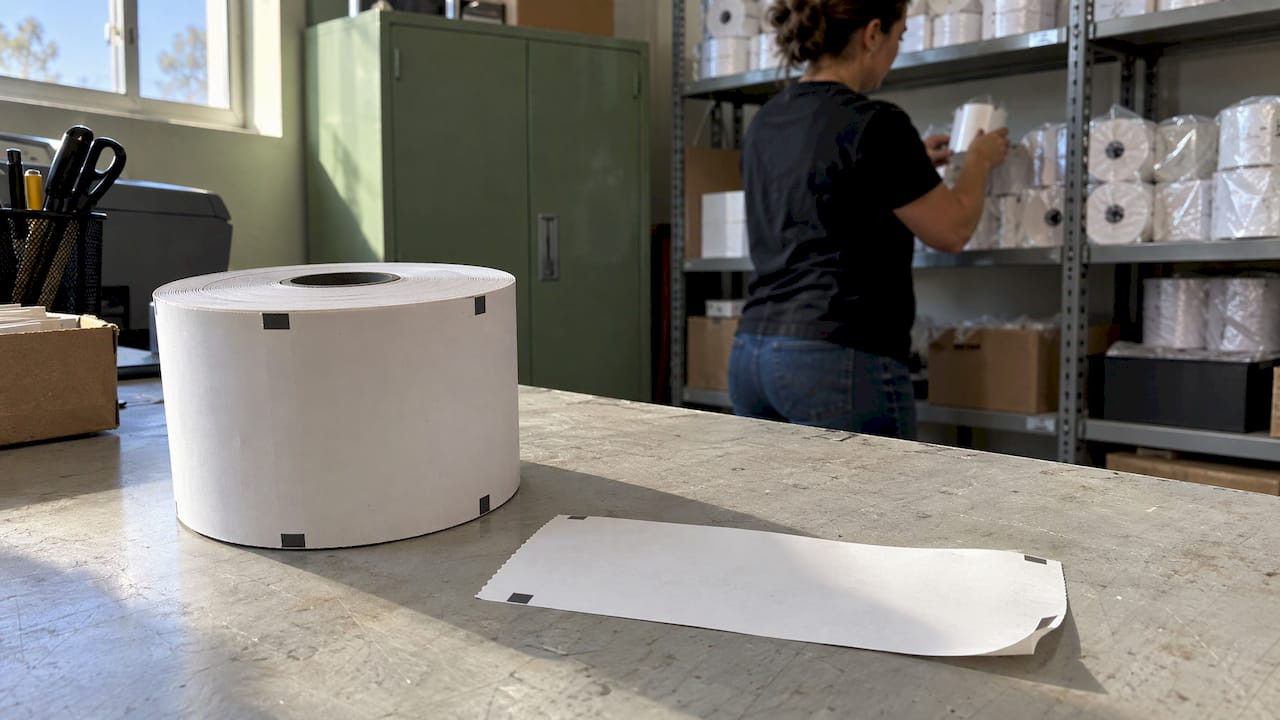
Heat Resistant Parking Tickets: What to Specify

A heat resistant parking ticket is one whose printed image stays readable and scannable after sitting in a hot car, a sunlit booth or a warm machine. For thermal tickets, that comes down to the paper’s activation temperature, its protective topcoat, and how you store and handle it. For valet operations, it also means choosing a ticket format that does not depend on heat-sensitive coatings at all. Below is what to check before you order, and where heat usually does the damage.
If you run a garage, a valet stand, a hotel or a casino entrance, you already know the cost of a faded ticket: a guest with no legible number, a barcode the exit lane cannot read, and a manual lookup that slows the line. Most of those failures are specified out at the ordering stage.
TL;DR
- Thermal paper darkens when it gets hot. Standard grades can start to discolor above roughly 50°C (122°F), which a parked car’s dashboard can easily exceed in summer.
- High-temperature thermal grades are built with a higher activation point and a protective topcoat. One published spec rates its paper for service up to 194°F (90°C).
- Check four things: activation temperature, a heat test result, topcoat, and approval or compatibility with your ticket equipment.
- Storage matters as much as paper choice: cool, dry, dark and away from solvents, oils and plasticizers.
- Carbonless multi-part valet tickets and pre-printed stock avoid the heat-reaction problem for the claim stub, and are the straightforward choice for valet.
Table of Contents
- Why heat is a problem for parking tickets
- What “heat resistant” actually means
- The numbers to check before you order
- Materials and printing methods for hot environments
- Where heat catches operators out
- How to specify heat resistant tickets, step by step
- When valet tickets are the better fit for heat
- Our perspective
- Get tickets matched to your operation
- FAQ
- Sources
Why heat is a problem for parking tickets
Most machine-issued parking tickets are direct thermal. There is no ink or ribbon. The printhead heats a coating on the paper, the coating turns dark, and that is your barcode and text. The same chemistry that makes this printing fast and low-maintenance means any other source of heat can start the same reaction.
Avery Dennison’s data sheet for a thermal top-coated paper warns that exposure above 50°C may cause premature imaging or discoloration, and that alcohol-based or volatile-solvent inks can discolor the coating too. That is 122°F. A ticket left on a dashboard, a rear shelf or a sun-facing windshield in a southern or desert summer can pass that point.
When the whole ticket darkens, the contrast between printed and unprinted areas drops. Text turns gray on gray, and barcodes lose the clean gap between bars that scanners rely on. The ticket may still look “printed”, but the exit reader or attendant cannot use it.
Sihl, a thermal paper manufacturer, adds a point that is easy to miss: flatness and smear resistance matter as much as heat resistance. Under heat and humidity, a ticket that curls can jam in a machine or fail to feed through a reader even if its image is intact.
What “heat resistant” actually means
The phrase is not a standard. Two suppliers can use it for papers with different performance, so the useful question is which number sits behind the claim.
There are two separate ideas:
- Higher activation temperature. The paper needs more heat before it starts to darken. A conventional thermal paper reacts at lower temperatures. KANZAN says its parking paper series uses a special coating that raises the start temperature to about 90°C compared with conventional thermal papers.
- Protective topcoat. A topcoat shields the thermal layer from light, water, oils and abrasion. Zebra’s high-temp receipt spec sheet describes a direct thermal, topcoated paper with temperature resistance up to 194°F (90°C), a service range from -40°F to 194°F, and windshield receipts among its suggested uses.
That same sheet states the paper has 12 times the life of conventional direct thermal products under fluorescent light and partial UV exposure through a window, and that images stay legible up to 20 years when stored below 77°F at 45 to 65 percent relative humidity and protected from light, heat, water, solvents, cleaners, plasticizers and oils. Read that last clause closely: even the best paper depends on how it is kept.
The numbers to check before you order
When you compare paper specs for parking tickets, these are the lines that matter. The figures below are examples from published data sheets, and your own supplier’s sheet will carry its own values.
| Spec | What it tells you | Example from a published sheet |
|---|---|---|
| Initial activation temperature | Where the paper first begins to darken. Higher is safer in hot environments. | 199°F (93°C) initial, 225°F (107°C) effective on a 5.0 mil parking-pass paper |
| Static thermal response | Temperature at which the paper reaches a given image density (ODU) | 85°C at 0.2 ODU and 105°C at 1.0 ODU on a topcoated paper listing spitter tickets and parking receipts |
| Heat test result | Image and background density after a set time at a set temperature | 80°C dry for 24 hours: 0.80 minimum image, 0.20 maximum background ODU |
| Moisture and light tests | Whether the image survives humidity and window light | Same sheet: 40°C and 90% RH for 24 hours, and 5,000 lx light for 100 hours |
| Image life and storage life | How long the print lasts and how long unused stock keeps | 10 years image life and 3 years storage on a paper that lists parking receipts as an ideal use |
A quick way to read the table: ODU is optical density, a measure of how dark the image or background is. You want a high number for the printed image and a low number for the background. A heat test that keeps the background below 0.20 after 24 hours at 80°C tells you the paper stays white in a hot environment, and that the print stays dark enough to scan.
Ask for the same test conditions from any supplier you compare. A result at 60°C is not comparable to one at 80°C.

Materials and printing methods for hot environments
Topcoated versus non-topcoated thermal paper
Topcoated papers add a barrier layer. That helps against oils from hands, hand sanitizer, rain, and scuffing from ticket handling. Sihl’s parking leaflet lists both topcoat and non-topcoat grades, with weights from 140 to 220 gsm, and notes heat resistance, SKIDATA approval and flexo and offset suitability. Non-topcoated parking papers can still reach high activation temperatures, as the KANZAN series shows, at a weight of 73 to 247 g/m².
Paper thickness is also a decision. Heavier stock, such as the 5.0 mil grade above, holds up in machine feeds and resists curl better than thin receipt stock. Thinner, 2.3 mil receipt papers suit shorter-life receipts and compact printers.
Pre-printing and backside printing
Thermal rolls can be flexo pre-printed with your logo, instructions or a terms panel. The Avery sheet lists letterpress, offset, screen, UV flexo and water-based flexo pre-printing as supported, with direct thermal variable printing up to 200 mm per second. One caution from the same sheet: solvent-based inks can discolor the thermal coating, so pre-print ink choice is part of the spec. Domtar’s thermal receipt paper page also notes backside printability and flexo pre-print suitability, which is useful when you want terms or a map on the back.
Direct thermal versus thermal transfer
Thermal transfer uses a ribbon, usually wax, resin or a mix. According to a printer maker’s explanation, those prints resist fading, heat and chemical exposure better than direct thermal, at higher cost and with more maintenance. Parking tickets are a common direct thermal use because the printers are simple and fast. For most operations, a high-temperature direct thermal paper is the practical match for the equipment already installed.
Phenol-free and BPA-free grades
Many current thermal papers are made without BPA, and some without phenols. Ricoh’s parking-pass paper is listed as phenol-free, BPS-free, BPA-free and with no added PFAS, and Domtar says increasing regulation is driving demand for phenol-free alternatives. If your venue sells to customers in states with chemical rules, ask for a statement that matches your policy.
Where heat catches operators out
Heat exposure is not just summer weather. These are the points in a parking or valet operation where tickets typically sit hot:
- Windshield and dashboard. Self-park tickets placed behind the glass get direct sun and the greenhouse effect. This is the harshest case, and it is why high-temperature papers list windshield receipts as an application.
- Outdoor booths and pay stations. Enclosed kiosks and cashier booths in full sun can run well above ambient air temperature, and rolls stored there sit hot all day.
- Printer interiors. A printer running continuously in a hot enclosure raises the paper’s baseline temperature before the printhead even fires.
- Vehicles and key boxes. Attendants who carry rolls or tickets in a truck, cart or pocket expose them to heat between locations.
- Storage rooms. Stock kept near a boiler room, loading dock or south wall ages before it is ever printed. Storage life on the data sheets assumes proper conditions.
- Chemical contact. Hand sanitizer, alcohol wipes, adhesive from plastic sleeves and vinyl holders can discolor thermal paper regardless of temperature. Both the Zebra and Avery sheets list alcohol, solvents, oils and plasticizers as hazards.
If winter conditions also matter at your site, the same coating behaves differently in the cold. Our guide to cold weather thermal tickets covers keeping prints sharp in low temperatures, and the thermal ticket fading checklist walks through the common causes of fading in daily use.
How to specify heat resistant tickets, step by step
1. Map the hottest place a ticket will sit
Write down where tickets are printed, where they are stored and where the guest keeps them. For self-park, assume the dashboard. For valet, the claim stub travels with the guest, while the windshield copy sits on the car.
2. Set a temperature target
Match the paper’s published service range to your worst case. A paper with a service range up to 194°F gives a wide margin over the 122°F level where standard grades start to react. Make sure you also check the cold end if your site sees winters.
3. Ask for the test, not the adjective
Request the heat test conditions and the density results. The pattern to look for is a hold at 80°C for 24 hours with a high image density and a low background. Pair it with the moisture and light results if tickets sit behind glass.
4. Confirm equipment compatibility
A paper that tests well but does not feed or read in your machines is no use. Check ticket size, thickness, black mark or notch position, and barcode symbology against your equipment. KANZAN lists technical approvals from parking equipment makers, and Sihl lists SKIDATA approval, which shows that approval is a normal part of the spec conversation. Our tickets are built for compatibility with major parking systems including Amano, TIBA, SKIDATA, FLASH Parking, Scheidt & Bachmann and Flowbird.
5. Decide on pre-printed elements
Choose logos, color blocks and terms with ink compatible with the thermal coating, and keep the barcode area clear of heavy pre-print so the scanner has contrast.
6. Set storage and handling rules
Store rolls cool, dry and dark in their original wrap until use. Rotate stock first in, first out. Keep sanitizer and cleaning chemicals away from the paper and out of the printer bay. Our ticket paper and moisture guide covers the humidity side in detail.
7. Test a batch in your real conditions
Print a sample set and leave it in the hottest spot in your operation for a day, then scan it. You are checking your own site’s worst case, and the result tells you how much margin you have.
When valet tickets are the better fit for heat
Not every ticket should be thermal. For valet, the claim stub does not need to be printed by a heated head at all. Multi-part carbonless valet tickets are written or numbered at the stand, and the copies are produced by pressure rather than heat. They carry sequential numbers, can be barcoded, and are laid out for the vehicle, the guest and the stand.
Our multi-part valet formats are:
- 2-part valet tickets, $250 one-off
- 3-part valet tickets, $35 to $250 one-off
- 4-part valet tickets, $42 to $48 one-off
- Barcoded valet tickets, $42 to $48 one-off
For a hotel with high volumes at the valet stand, a carbonless set avoids the guest-facing heat problem on the claim stub and still gives you a trail for the key tag, the vehicle copy and the office copy. For machine-issued or spitter formats used at gated lots, see our machine issued valet tickets and dispenser and spitter tickets.
If you want the longer comparison of materials, our parking ticket paper guide sets stock paper against thermal rolls, and the heat resistant tickets article goes into valet and parking operations specifically.
Our perspective
We have been manufacturing parking and valet tickets since 1937, and the pattern in tickets that fail is rarely the printer. It is a mismatch between the paper and where the ticket spends its day.
A ticket has to survive three places: the machine or stand where it is issued, the car or pocket where it travels, and the lane or desk where it is read. Specify for the hardest of the three. For self-park, that is usually the windshield. For valet, it is the guest’s hand and the hotel entrance in July.
That is why we offer both stock and fully customized tickets, with sequential numbering, barcoding, security features, custom colors and multi-part carbonless formats, and why we keep millions of tickets in stock for fast nationwide shipping. Durable printing and compatibility with the major parking systems are part of how we build them, so the ticket does its job in the lane and at the stand.
Our advice to operators is simple: define the conditions first, then choose the ticket. Let us help you match the format to the operation.
Richard
Get tickets matched to your operation
We manufacture custom and stock parking, valet and hospitality tickets for parking operators, hotels, casinos, hospitals, universities, venues and municipalities, with sequential numbering, barcoding, logos and security features. If heat is a concern at your location, tell us where your tickets are printed and where they travel, and we will help you choose a format that suits the equipment and the conditions.
Browse the full range on caymil.com, or go straight to barcoded valet tickets if your exit lane reads barcodes. For a broader read on options, see our top parking ticket material options.
FAQ
At what temperature does standard thermal parking paper start to darken?
Manufacturer data sheets give different values by grade. One thermal top-coated paper sheet says exposure above 50°C (122°F) may cause premature imaging or discoloration. High-temperature grades raise this: Zebra’s sheet lists a service range up to 194°F (90°C), and Ricoh’s lists initial activation at 199°F (93°C). Always read the specific sheet for the grade you buy.
How long will a thermal parking ticket stay readable?
It depends on the grade and the conditions. Published sheets cite 10 years of image life for some receipt papers and up to 20 years for a high-temperature grade, but only under controlled storage: cool, dry, away from light, solvents and oils. A ticket on a hot dashboard is far from those conditions, which is why heat testing matters more than the headline figure.
Does a topcoat make a ticket heat resistant?
A topcoat protects against moisture, oils and abrasion, and it often comes with a higher activation temperature, but the two are separate features. Check both the coating and the activation or heat test numbers on the data sheet. A topcoat alone does not tell you how the paper behaves at 80°C.
Can I avoid heat problems on valet tickets?
Yes. Multi-part carbonless valet tickets are numbered and written at the stand, so the guest’s claim stub does not rely on a heat-reactive coating. Barcoded versions are available for operations that scan at the exit. We can also supply thermal and machine-issued formats where your equipment requires them.
What should I tell a supplier when ordering for hot climates?
Give the ticket size and thickness, your equipment brand and model, the barcode type, where tickets are stored and printed, and the hottest place a ticket will sit. With that, a supplier can match the paper and format to the conditions rather than to a generic spec.
Sources
- Avery Dennison AT810 Thermal Top product data sheet
- Zebra 8000D 3.2 mil High-Temp Receipt spec sheet
- Ricoh 140TLE PF spec sheet
- Appvion Résiste 200-7.0 E datasheet
- Domtar POS 55S-2.3 spec sheet
- Domtar Clarion POS thermal paper
- KANZAN KPW parking paper series
- Sihl thermal paper for car park tickets
- Direct thermal vs. thermal transfer printing technology