
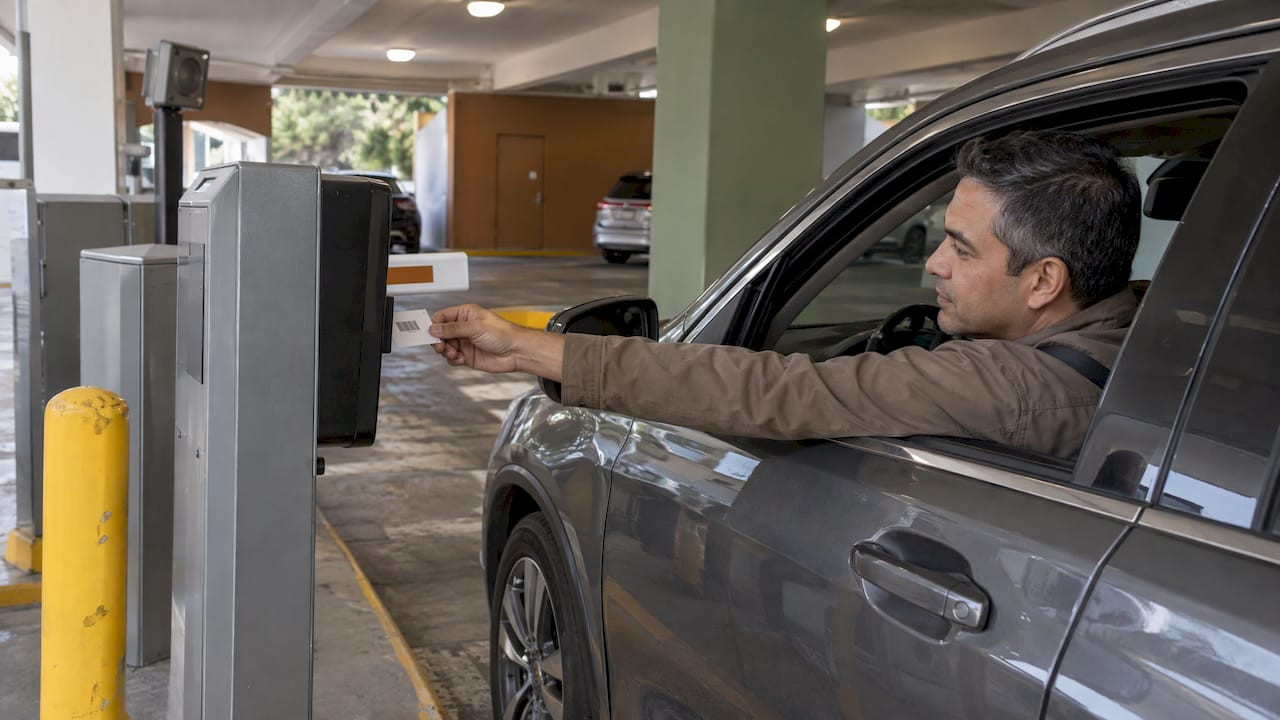
Flash Parking Barcode Issues: Causes and Fixes for Operators

Most Flash Parking barcode failures come from one of four places: the vehicle (not detected at the loop), the barcode itself (invalid, damaged, duplicated or out of range), the scanner hardware, or the lane flow around the gate. The error message tells you which. Read it first, then fix the right layer. Once the hardware and lane are ruled out, the ticket is the one input you fully control. We manufacture barcode tickets for parking operations, including formats made to work with Flash systems, so this guide covers all four layers and puts extra weight on the ticket.
TL;DR
- Read the exact message on the kiosk or in the Failed Scans log. “No Vehicle Present” is a lane problem, “Invalid Barcode” is a ticket or data problem, and “already checked-in” can be either.
- For a scanner that will not read, check that every scanner connection is secure before anything else, then contact Flash Support.
- Printed validation and coupon barcodes are single-use. Copies and duplicates cause failures.
- Barcode range, print quality and sequential numbering are ticket-side causes you can prevent before a single car arrives.
- Never void a reservation or payment to clear a scan failure. Use the documented exit flows instead.
Table of Contents
- Why a barcode failure is rarely just “a bad barcode”
- The four layers to sort a failed scan
- Entry failures: what each message usually means
- Exit and validation failures
- How to tell whether it is the ticket, scanner, lane or system
- What to check first when a barcode will not scan
- Resolving a failure without voiding or double charging
- Barcode failures versus QR-code and license-plate problems
- When and how to escalate to Flash support
- Preventing ticket-side failures before they happen
- Where our tickets fit
- Our perspective
- FAQ
- Sources
Why a barcode failure is rarely just “a bad barcode”
A scan at a Flash-equipped lane is not a simple read. The system checks several things in sequence, and a failure at any step looks like “the barcode won’t work” to the driver behind the wheel.
Parkonect, Flash’s access and revenue software, verifies vehicle presence before it checks a scanned barcode. If no vehicle is detected, it displays “No Vehicle Present” and returns to the start screen. A perfectly good ticket held up to the scanner with the car stopped short of the loop will therefore appear to fail.
Only after that does the system test the barcode. At entry it looks at whether the reservation is for the correct garage, whether its time is unrestricted, whether the same barcode already has an open ticket, and whether passback rules are violated. Each of those has its own rejection, and each has a different fix.

That is why the first job at the lane is diagnosis, not re-scanning. Trying the same ticket five times can turn a simple positioning problem into a “barcode already checked-in” problem.
The four layers to sort a failed scan
| Layer | Typical sign | Who fixes it |
|---|---|---|
| Vehicle and loop | “Vehicle not Detected” or “No Vehicle Present” | Attendant repositions the car; technician recalibrates the loop |
| Ticket or barcode | “Invalid Barcode,” damaged print, out-of-range number, duplicate | Operator, through ticket specification and print quality |
| Scanner hardware | Nothing reads, any ticket | Operator checks connections, then Flash Support |
| Lane flow and records | “Already checked-in,” “Parker already left or never entered” | Operator, using logs and the exit flows |
Keep this table at the booth. When one lane shows failures across many tickets, suspect hardware or the loop. When failures follow a single ticket batch, suspect the ticket.
Entry failures: what each message usually means
Vehicle not detected
Flash’s guide to common kiosk errors explains that “Vehicle not Detected” can occur when the car is not positioned over the entry loop. It lists vehicle absence and loop recalibration as causes. The practical check is simple: is the vehicle actually sitting over the loop, and has this happened to every car in the lane or just one? Motorcycles, low-slung cars and drivers who stop a few feet early are the usual suspects. A lane where every car triggers the message points to calibration, which is a technician’s job.
Invalid barcode
Flash defines “Invalid Barcode” as a barcode that is not present in Parkonect or not assigned to an active parker. That wording matters. The scanner may have read the code perfectly. The system simply does not recognize it.
Parkonect can also reject an entry scan because the barcode is outside the site’s valid range, disabled, tied to an open balance, or scanned during a restricted period. Three of those four causes have nothing to do with print quality. They are configuration and data issues, and they are the reason a ticket order should be specified against the site’s setup before it is printed.
Damaged or unreadable barcodes
At entry, Flash’s error guide lists an invalid or damaged barcode among the failure types. Damage in a garage is mundane: creased stock, moisture, sun on a dashboard, ink that smears when handled. A barcode that is cracked, faded or low-contrast reads inconsistently, and inconsistent reads create the repeat scans that cause secondary errors.
This is where ticket stock earns its keep. Durable printing and clean, high-contrast barcodes cut down on the reads that fail at the edge. We cover the stock side in more detail in our garage parking ticket durability tips.
Barcode already checked-in
This one is easy to misread. Flash’s failed-scans guide says “Barcode already checked-in” can reflect a genuine second-entry attempt, or a prior gate or vehicle-flow problem in which the system recorded the scan but the vehicle never cleared the lane.
So before you assume the driver is passing a ticket back, ask whether the gate failed to vend or a car ahead blocked the lane. If the first scan was recorded and the car never moved, the second scan is not fraud. It is a lane failure that needs a manual resolution.
Exit and validation failures
Exit errors tend to be the most expensive, because the driver is already annoyed and a line is forming.
Flash’s guide to failed scans says “Parker already left or never entered” can occur when an exit was already recorded, including after a gate failed to vend or a vehicle could not pull forward and the customer rescanned. Again, the cause is often the lane, not the ticket.
Validation adds its own failure modes. Scanning before the access method, an expired or used validation, and an already-used or incompatible coupon can all produce an error, according to Flash’s kiosk error guide. The order of operations matters: the parker’s access credential first, then the validation.
Single-use validation and coupon barcodes
Flash’s validation-portal documentation states that printed validation or coupon barcodes are single-use. Copying them is prohibited, and duplicates can cause complications when a parker attempts multiple uses.
For operators, that has two consequences. First, a photocopied or reprinted validation should never be handed out as a convenience. Second, if you issue validations through hotels, restaurants or retail partners, you need a way to control who gets them and how they are numbered. Our guide to validation abuse in parking walks through how it happens and how to stop it, and our piece on parking ticket security covers the printed features that make tickets harder to duplicate.
How to tell whether it is the ticket, scanner, lane or system
A fast triage keeps you from replacing the wrong thing. Work through these in order.
- Is a vehicle detected? If the kiosk shows a vehicle-presence message, stop. The barcode has not even been evaluated yet.
- Does the failure affect all tickets or one? All tickets in one lane suggest the scanner, its connections or the loop. One ticket points to that ticket.
- Does the failure follow a batch? If tickets from the same print run fail more often than others, check the number range and print quality of that batch.
- Is the message about the record, not the read? “Invalid Barcode,” “already checked-in” and “already left or never entered” are record-state messages. The scanner read the code and the database disagreed.
- Check the logs. Flash’s reporting documentation identifies a Failed Scans Log with detailed failed-scan records and an API Vend Log that records gate vends triggered by gate kits or APIs. Matching a driver’s complaint to the log entry usually settles the question in a minute.
Pull the Failed Scans Log weekly even when nobody is complaining. Patterns such as a cluster of invalid-barcode events at one entrance or one hour of the day show a recurring cause that individual incidents hide.
What to check first when a barcode will not scan
When nothing reads at all, resist the urge to swap tickets or reboot everything. Flash’s kiosk scanner guide gives the documented first step: make sure all scanner device connections are secure. If the issue continues, contact Flash Support. The guide does not prescribe voiding a reservation or payment after a scan failure, and operators should not improvise that either.
A reasonable at-the-booth sequence:
- Confirm the connections to the scanner are seated and secure.
- Try a known-good ticket from a different batch to separate a hardware fault from a ticket fault.
- Look at the barcode itself: creases, smudges, moisture, glare.
- Check the message against the lists above.
- If it still fails, escalate with details.
Resolving a failure without voiding or double charging
Voiding a payment to “reset” a lane is how double charges happen. The documented exit flows are safer.
Flash’s transient-exit flow says a paper-ticket parker scans the ticket, follows the payment prompts, and pulls forward through the open gate. If a scan fails mid-process, the question for staff is where in that sequence the customer stopped, not whether to cancel the transaction.
The same page notes that an eParking voucher can still be used when kiosks are offline, provided the voucher was first created while the kiosks were online. That is worth remembering when a lane loses connectivity: online-created vouchers keep working, so the problem may be narrower than it looks.
Train attendants on three rules:
- Do not void a paid reservation to clear a failed scan.
- Note the ticket number, lane and time before touching anything.
- Use the open-gate and exit flows rather than re-running the payment.
Barcode failures versus QR-code and license-plate problems
Not every failed exit is a barcode failure. Flash’s call-center guide separates a license-plate read failure from a barcode failure: when entry LPR matched an Express Pay session but exit LPR failed, staff should use the digital ticket QR code from the entry SMS or partner app as the backup credential.
For transient parkers, LPR may automatically vend the exit gate once payment is fully validated or paid, and those parkers interact with the entry kiosk normally. If a driver says the “ticket” failed but the facility uses LPR, ask what credential they were actually using before you blame the paper.
The practical takeaway for a mixed facility: keep a physical barcode ticket path that works independently of plate reads and apps. Paper does not depend on a camera angle, a phone battery or a cell signal.
When and how to escalate to Flash support
Escalate when the connection check does not fix a scanner, when a whole lane fails across tickets, or when the logs show failures you cannot explain. Have the lane, the time, the exact message, the ticket or barcode number and what you already tried ready before you call.
Flash’s self-service page lists the contacts by product:
- Flash PARCS and Valet: support@flashparking.com, 888-737-7465
- Parkonect: support@parkonect.com, 224-507-7408
- Enforcement and Events: ungatedsupport@flashparking.com, 888-991-7275
- ParkWhiz customer support: help@parkwhiz.com, 888-472-7594
These are from Flash’s self-service links page. Check it for the current list before relying on any number printed in a binder.
Preventing ticket-side failures before they happen
Hardware faults and lane flow are things you manage. Ticket-side failures are things you can design out.
Specify the barcode range to match the site. Because a barcode outside the site’s valid range is a documented rejection reason, the numbers on a printed batch must fall inside what the system expects. Our guide to parking barcode formats for operators covers what to confirm before ordering a large run.
Use sequential numbering. Sequential numbers make duplicates and gaps visible. When a ticket fails, you can find where it sits in the run, which makes both audits and troubleshooting faster. Our parking facility audit guide shows how to use ticket records this way.
Protect print quality. Clean, high-contrast barcodes on durable stock stand up to handling, moisture and sun better than thin or poorly printed paper.
Do not duplicate single-use codes. Reprinting validations from a template is the fastest route to the duplicate complications Flash warns about.
Keep stock on hand. A lane that runs out of a verified ticket and falls back to an unverified one invites invalid-barcode events.
Label by purpose. Separate stock for entry tickets, validations and valet makes it harder for the wrong credential to land in the wrong lane.

Where our tickets fit
Caymil has manufactured parking and valet tickets since 1937. Our products are designed to be compatible with major parking systems, Flash Parking among them, alongside Amano, TIBA, SKIDATA, Scheidt & Bachmann and Flowbird. We offer barcoding, sequential numbering, logos, security features and multi-part carbonless formats, in both stock and fully custom runs, with millions of tickets in stock and fast nationwide shipping.
For operators running barcode valet programs, our barcoded valet tickets are published at $42 to $48. Machine-issued and dispenser formats are available through our machine issued valet tickets and dispenser and spitter tickets pages. If you want to see how barcodes improve garage flow overall, read why barcode tickets make parking garages more efficient.
If you are planning a reorder, send us the barcode format your site uses and we will build the run around it. You can start from our home page and browse the full range.
Our perspective
When a scan fails, the ticket gets blamed first because it is the thing in the driver’s hand. Often the real cause is the loop, the lane or the record. Fair enough. But after the hardware and the flow have been checked, the ticket is the one part of the system you can specify completely in advance.
That is why we treat a ticket order as a technical job, not a commodity purchase. Barcode range, numbering, contrast, stock and format all affect how a ticket behaves at a lane. Since 1937 we have focused on parking and valet tickets, and our products are built to work with the major systems operators run, Flash among them.
Our advice to any operator: decide the barcode specification with your system in mind, order sequentially numbered tickets, keep enough on the shelf and give your attendants a one-page guide to the error messages. Do those four things and most of the daily scan trouble becomes the kind you can explain in a minute.
Richard
FAQ
Why does my Flash Parking barcode say invalid?
Flash defines an invalid barcode as one not present in Parkonect or not assigned to an active parker. Other causes include a barcode outside the site’s valid range, a disabled barcode, an open balance or a restricted time period. Check the Failed Scans Log to see which applies.
Can I reuse or copy a validation barcode?
No. Flash states that printed validation and coupon barcodes are single-use and that copying them is prohibited. Duplicates can cause complications when a parker tries to use them more than once. Issue each validation once, and number them so you can track them.
What should I do first if the scanner reads nothing?
Check that all scanner device connections are secure. If the problem continues after that, contact Flash Support with the lane, time, message and what you tried. Do not void the customer’s reservation or payment to clear it.
What does “barcode already checked-in” mean?
It can mean a real second entry attempt. It can also mean the system recorded a scan but the vehicle never cleared the lane because of a gate or flow problem. Review the lane history and logs before treating it as misuse.
Is a failed exit always a barcode problem?
No. At facilities using license plate recognition, a failed plate read at exit is a different problem from a failed barcode. Flash’s guidance is to use the digital ticket QR code as a backup credential when the exit plate read fails after a matched entry.
Sources
- Common Flash PARCS Kiosk Error Messages
- Parkonect: System Overview
- Parkonect: Failed Scans Explained
- FlashOS: Process Validations and Coupons via Validation Portal
- Parkonect: Reports
- Flash PARCS: Kiosk Barcode Scanner
- Flash PARCS: Transient Exit Flows
- Flash PARCS Call Center Guide: license plate read failure
- FLASH Vision: Overview
- Flash PARCS: Self Service Links